OBJExport library – export color meshes from Processing

Posted: March 13th, 2013 | Author: Jesse Louis-Rosenberg | Filed under: software | Tags: , | 1 Comment »

We’ve just released a new Processing 2.0 library for exporting OBJ and X3D mesh files. And it supports color meshes! Now you can export color models for 3D-printing with same commands you use to draw. Get started here: OBJExport library page.

The library works like any PGraphics, such as the PDF library. Simply call

createGraphics(width, height, "nervoussystem.obj.OBJExport", filename)

to get the PGraphics for obj export and use regular Processing drawing commands.

I’ve also started to use GitHub to manage the code for this and other projects. You can find the github page for the library here. This page can be used to peruse the source, fork the project or report bugs.

This library is a re-release of an old library I made years ago. I had sort of forgotten about it until I got an email last week from Michael Zoellner of the Interactive Design program at Hof University. Apparently, people are still using it! He wanted to update the library to be compatible with the new Processing release.

At the same time, we’ve started to do some work color 3d printing. However, to get printable models we had to go through some tedious processing MeshLab. So, I took this opportunity to overhaul the library, adding new features like color exporting and fixing some old bugs.

We’re excited to see what the community does with the library. We’re using it to make color 3d-prints, what are you going to do? Try it out and send any feedback to jesse@n-e-r-v-o-u-s.com


Cell Cycle – technical details

Posted: March 12th, 2012 | Author: Jesse Louis-Rosenberg | Filed under: software, thoughts | Tags: , , , | No Comments »

For a while now, we’ve been wanting to switch our online apps from Java applets to HTML5. Applets are simply an outdated technology with a much clunkier, inelegant user experience. Finally, in the last two weeks, we’ve had the time to dig in and start porting our apps. Not only is the technology superior for developing HTML5 apps, but we’ve also learned a lot since we first released customization apps in 2007.  We decided to tackle the most complex one first, the Cell Cycle app. In this post, I’ll go over some of the tech we used and some of the hurdles we encountered.

The Tech

The first thing we had to decide was how we wanted to go about translating our app from Processing, our development environment of choice, to Javascript. I considered rewriting the entire thing from scratch as a kind of JS learning exercise, but decided it was not worth while. The next obvious choice was to use the amazing ProcessingJS, which allows you to run pure Processing code directly in the browser. However, the 3D capabilities of PJS are somewhat limited, so I spent some time looking at other frameworks people have developed around WebGL, such as Mr. Doob’s Three.js. Despite there being some great frameworks out there, I decided that the options were too heavy handed and required too much specialization. The great thing about Processing is how subtle it is. It does exactly what you think it should without extraneous syntax getting in the way.

ProcessingJS

Ultimately, we went with a hybrid of the first two options. We used PJS so that we could reuse the core logic of the original Processing app, but we used pure JS and webGL for drawing. One of the amazing things about PJS is you can mix Processing code and Javascript directly. This allowed us to write JS drawing functions and simply replace the drawing parts of our Processing code. There is an additional benefit/detriment to this ability of PJS. You cannot only call JS functions from Processing, but can combine the object models of Java and Javascript. You have the clean and compact class definitions of Java. But you have the mutability of Javascript that avoids the “over-objectification” that is common in Java. I find this a really refreshing way of coding; however, to the casual user the mixing of Java and Javascript may end up looking like gibberish.

No Libraries

One of the unfortunate aspects of PJS is cannot directly leverage the great community that has grown up around Processing and developed so many powerful libraries to extend Processing. There is no easy way to use Processing libraries in PJS, and in many cases, it is non-trivial to port libraries to PJS. So the first thing we had to do was remove any library dependencies from our code, which included controlP5 and PeasyCam. We replaced these with our own code. This wasn’t so bad, since the app needed a UI overhaul anyway.

the old Java version

Features

The original Java version of the Cell Cycle app had a number of problems. The interface was cluttered; it was buggy; you couldn’t save and share models; you couldn’t subdivide cells on the inside of the bracelet; etc. We took this rewriting as an opportunity to fix and add a bunch of features. Originally, there were three different “view modes”: 3D, smooth, and 2D. We combined all of these into one. The model is always smooth (more on this next) and with the extra screen real estate of the browser, we can show 2D and 3D views simultaneously.

The new version autosizes! Previously there was a “radius”, which corresponds a parameter in the mesh generation but has no relation to the user. It doesn’t correspond to the inner radius or outer radius of the final piece. We updated this version so the user specifies the interior diameter of the final piece. The code then iteratively resizes the piece until the interior dimension is approximately correct. This way a user can specify a size and no matter what they do to the model afterwards, it remains the same size.

Permalinking! It is practically necessary to have permalinks to user generated content on the web these days. If you can’t tweet something or post it to facebook, it might as well not exist. Not only can you link to a model now, but you (or anyone) can continue editing. Instead of saving the mesh that gets 3D printed to our server, we save an abstract representation of the current model state. The actual 3D mesh is reconstructed upon loading. Not only does this allow geometry to be smartly reloaded for editing, but also makes the models much lighter. This saves space, bandwidth, and load times.

Optimization

The biggest amount of development we had to do was optimization. Things have to run fast in the browser. The majority of processing power goes towards generating the mesh and passing that info to the GPU with webGL. Displaying large, static models using openGL is easy. You load up a model into a VBO once, and that’s it. You can display millions of triangles at really fast frame rates. All the work is done in a preprocess, so you don’t have to worry optimization. However, when you have a large, dynamic mesh that is constantly changing, optimization becomes important.

One thing we decided is it couldn’t be completely smooth all the time. The meshes are smoothed through Catmull-Clark subdivision. The models that we send to the printer have two subdivision steps preformed on them. This is simply too much computation to be done in real time.  Instead, while the model is moving we only perform one subdivision. When the model settles and stops, which happens pretty rapidly, we perform a second subdivision and store that in a VBO.  Until it moves again, we do not update the VBO.

But this in and of itself was insufficient using the naive drawing methods that we had previously. The meshes are represented using a Half edge data structure. This stores connectivity information of our mesh faces in a compact way. The simple approach to drawing the mesh is to loop through all the vertices and faces of a mesh, dump that info into arrays that gets passed to the GPU. The problem is that regular JS objects and arrays are not particularly performance oriented. Simply looping a large array of objects and performing basic operations is a significant CPU drain. The key to getting around this is doing as much as possible in fixed-type arrays that were introduced into Javascript specifically for webGL. These include Uint16Array, Float32Array, etc. In my experience, these arrays are far more efficient than generic arrays. Instead of subdividing and creating a new Half edge mesh, the subdivision data goes directly into fixed-type vertex and index arrays that can be passed to webGL. Additionally, other computations, such as surface normals and volume are performed directly out of these buffer arrays. This was ultimately key to  getting interactive framerates.


Reaction lamps

Posted: September 12th, 2010 | Author: Jessica Rosenkrantz | Filed under: design, housewares | Tags: , , , | 8 Comments »

seed #1

reaction lamp - seed #2 reaction lamp - seed #1

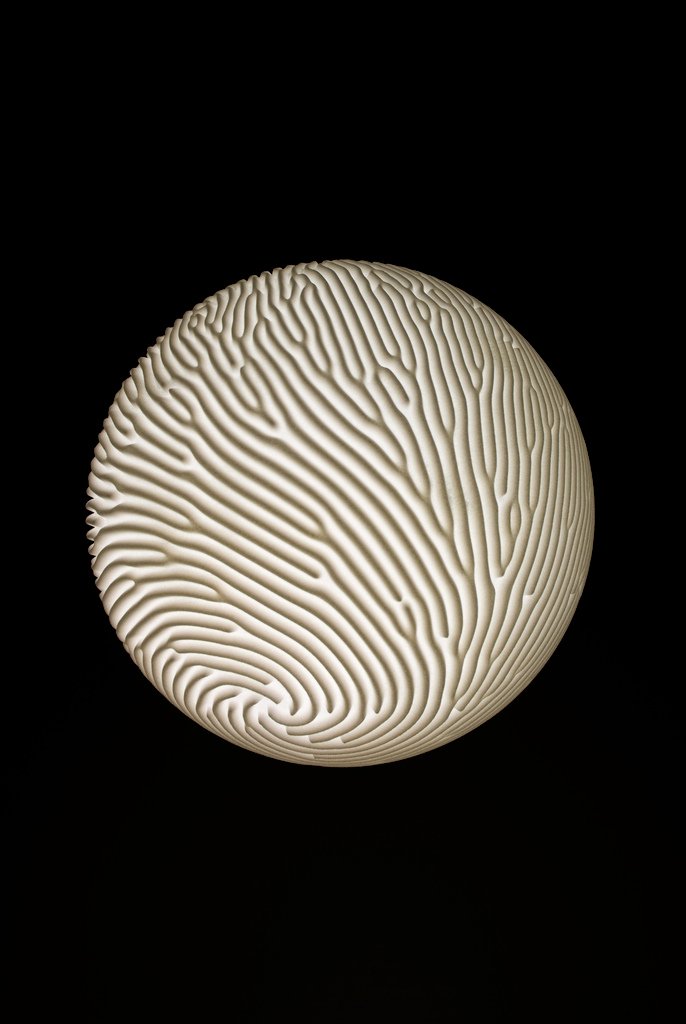
Our new reaction collection includes 3dprinted pendant lamps created by means of Selective Laser Sintering. The Spiral lamp (below) is covered by ridges and valleys that transmit different amounts of light when illuminated; they furnish a striking pattern whether the lamp is on or off. We orchestrated a pattern that twists elegantly towards the base of the lamp where it terminates in a gentle spiral. Lines diverge and converge along the contours of the sphere, blanketing the surface in many deep grooves. We think the pattern recalls the forms of sand dunes and hard corals.

spiral lamp reaction - spiral lamp

The seed lamps play with reaction-diffusion at different scales to produce an organic effect. A simple sphere grows into a complex sculpted surface by layering reaction patterns at a micro and macro scale. The larger scale pattern creates the overall topography of the lamp while the smaller scale modulates the surface thickness to reveal a cellular texture when lit. In seed#1 (first lamp above), the patterns at both scales are cellular, however the surface is punctured only according to the disposition of the smaller scale. We were inspired by microscopic images of seeds where both the overall shape of the seed and the cells of which it is composed are visible

reaction lamp - seed #2 reaction lamp - seed #2

In seed#2, the macro and micro scale patterns each have a distinct character and they interact to create a pattern of perforations limited to the valleys of its landscape.

The lamps were all generated using software we created in the open source programming environment Processing that simulates reaction-diffusion.  The video below shows the generation of two seed lamps.

Reaction-diffusion (RD) has become one of the most canonical examples of complex behavior that emerges from a simple set of rules. RD models a set of substances that are diffusing, or spreading; these substances also react with one another to create new substances. This simple idea has been suggested as a model for a diverse set of biological phenomena. All kinds of animals from fish to zebras display interesting color patterns on their skin and shells which play important roles in their behavior. However, the underlying cause of these patterns is still not understood. In 1952, Alan Turing suggested the RD system as an answer to not only this question but also the more general one of why cells differentiate. How do individual cells locate themselves in the larger scale structure and pattern of an organism? The patterns seen on the animals occur over a scale much larger than a cell, yet they display remarkable self-similarity on every part of the animal’s body.

Turing studied the behavior of a complex system in which two substances interact with each other and diffuse at different rates. He proved mathematically that such a system can form stable periodic patterns even from uniform starting conditions. One of the most interesting things about RD is that you can have a homogeneous system where every cell is doing exactly the same action (for instance just producing a certain amount of some chemicals); but from this one process a large scale structure emerges.

reaction diffusion fish face

The diagrams below show a simple RD model. There are two substances. One, the activator, increases the synthesis of both itself and another substance, the inhibitor. However, the inhibitor locally inhibits the production of activator. This simple interaction is enough to generate the patterns shown below.


reaction lamp #1

Posted: August 14th, 2010 | Author: Jessica Rosenkrantz | Filed under: housewares, work in progress | Tags: , , | 11 Comments »

more pieces for our show are arriving! here’s a peak at one of the lamps we designed. we’ll do a real post on the ideas and code behind the creation of the reaction pieces sometime soon….I promise. The short of it is we created the lamp in Processing and it was 3dprinted using Selective Laser Sintering in nylon plastic. We varied the material thickness to create an intricate effect when illuminated.

reaction pendant lamp #1 arrived reaction lamp - spiral

The form is generated through a simulation of reaction-diffusion, a natural process that is theorized to be involved in everything from animal skin patterns to cell differentiation. For this lamp, we control the reaction through anisotropic diffusion. Anisotropic means that we varying the rate and direction of diffusion through space. This allows us to create a form that is at once controlled and organic.

This video shows a 2D reaction where the primary direction of diffusion is being varied by a noise function. The reaction is based on the Gray-Scott model , where one of the chemical concentration is being represented by the black color. The difficult part of this project was developing a controlled way to use reaction diffusion in 3D. Our aim was to create a pattern that would complement the spherical form and provide intruige in lit and unlit states of the lamp. Our solution involved crafting a spiraling reaction that terminates at the base of the sphere.

This lamp as well as more explorations of reaction-diffusion will be exhibited at Rare Device in San Francisco from September 2 to October 10.


Barnacles

Posted: July 15th, 2010 | Author: Jessica Rosenkrantz | Filed under: graphics | Tags: , | No Comments »

Written Images; a project in contemporary generative print design and art. Its final products will be a book that presents programmed images by various artists. Each print in process will be calculated individually – which makes every single book unique.”

Last night we made a Processing sketch for Written Images.  Since we left our submission until the last minute, we decided to adapt an old project….due to my recent trip to the Aquarium, the barnacle sketch came to mind. Our main hurdle was figuring out how to tile our sketch to create the 4080×2720 px required for the book layout and stay under the 15 second time limit.  Since we had a lot of geometry to draw,  using the processing drawing methods turned out to be way too slow and we had to change the sketch to draw all triangles using OPENGL commands.  This meant we also had to use OPENGL lights and control the camera via GL.  I think the sketch came out ok, although I’d definitely like to work on it more when I get a chance.

4795230681_655ec1e123_b

Each execution of the program, a new random double curved NURBS surface is created for the barnacles to grow on.  Colors range from yellow to pink based on generation of the barnacle, yellow barnacles randomly subdivide into pinker and pinker ones.  The pores will also be open to different degrees between the different executions of the program. We also made a straighter version… incase the smoothed version doesn’t run fast enough on their computer.

4795226825_35a7a9375d_z


ceramics

Posted: June 14th, 2010 | Author: Jessica Rosenkrantz | Filed under: design, video | Tags: , , , | 1 Comment »

We’ve been talking about doing some designs for ceramics for awhile now.  So without further delay I bring you these sketches we made a few days ago for some cup designs based on diffusion reaction.

4701469153_79f59dc081_o

4693721169_0f5e2d2089_b4694359034_5483fd0e6d_b


differentiation

Posted: March 15th, 2010 | Author: Jessica Rosenkrantz | Filed under: video | Tags: , , | No Comments »

a processing sketch made while procrastinating on a number of fronts


Computational design: a new look at the natural world

Posted: March 3rd, 2010 | Author: Jesse Louis-Rosenberg | Filed under: education | Tags: , | 2 Comments »

jessesclass

Jesse is teaching a class this spring with the support of sprout.  It essentially covers the topics of interest to us at Nervous System: taking computational models of natural systems and adapting them for design work.  It is somewhat technically focused and is geared towards designers with some familiarity with programming/science or those with a science/programming background who want to learn and be creative.  If you are in the Boston area, take it!  Also, each session is made to be stand-alone (or in conjunction with one other week), so if you just want to attend one topic of interest you can.  Each week will center around one simulation technique (and some additional geometry generating material), and we will work through and play with one or more example systems.

More information below: Read the rest of this entry »


venation type field

Posted: January 31st, 2010 | Author: Jessica Rosenkrantz | Filed under: graphics | Tags: , , | No Comments »


venation type field, originally uploaded by nervous system.


venation – the letter E

Posted: January 20th, 2010 | Author: Jessica Rosenkrantz | Filed under: video | Tags: , , | 1 Comment »

Here’s a video showing how our venation applet applied to generative typography